
 GLOBAL SECURITY GROUP INTL
Let the Camera Decide: NVR vs DVR for Facility Managers in 2026
Licensed, insured and local — professional security services in Southwest Florida, staffed by trained Global Security officers.
For most new camera installs in 2026, an NVR is the smarter buy, because IP cameras encode video on-camera and deliver sharper resolution, better analytics, and easier expansion. A DVR still earns its place when you already have working coax runs or only need basic 1080p coverage on a tight budget. The decision usually comes down to one technical fact: where the video gets encoded, which we cover in detail below, with ONVIF standards and field experience from Global Security backing the guidance.
TL;DR:
- Most new installations in 2026 should opt for an NVR system, as they support higher resolution, AI features, and easier expansion compared to DVRs.
- DVRs are suitable only if existing coax wiring is present, the budget is tight, or 1080p quality is sufficient for current needs.
- NVRs encode video at the camera, allowing support for 4K resolution and making integration with multiple brands through standards like ONVIF easier.
- Ethernet cable runs (up to 100 meters) limit NVR deployment distance, while coax runs can extend much farther but offer lower resolution capabilities.
- Proper network security, including VLANs, changing default passwords, and firmware updates, is crucial to mitigate exposure risks when deploying IP cameras and NVRs.
Table of Contents
- NVR vs DVR: What Actually Separates Them
- How DVR Systems Work: Components, Cabling, and Limits
- How NVR Systems Work: PoE, On-Camera Encoding, and Smart Features
- NVR vs DVR Comparison: Cabling, Cost, and Features Side by Side
- Hybrid Recorders and Practical Migration Strategies
- When Choosing a DVR Makes Sense
- When Choosing an NVR Makes Sense
- Network Exposure and Basic Security Steps for NVR Deployments
- Global Security’s Decision Framework for Recorder Choice
- Get a Professional Security Assessment for Your Property
- Sources
- FAQ
NVR vs DVR: What Actually Separates Them
The real dividing line between these two systems is where the video signal gets converted from light into digital data. A DVR (Digital Video Recorder) works with analog cameras that send a raw signal down a coaxial cable. The recorder itself does the encoding once the signal arrives. Common analog standards include CVBS, HD-TVI, HD-CVI, and AHD, each pushing resolution a bit further than old-school analog but all sharing the same basic architecture.
An NVR (Network Video Recorder) works the opposite way. The camera itself encodes the video, typically using H.264 or H.265 compression, then sends the finished digital stream to the recorder over Ethernet. The encoding location drives nearly every downstream difference between these platforms, including:
- Cabling type (coax versus Cat6 network cable)
- Power delivery (separate power run versus single PoE cable)
- Maximum achievable resolution
- How easily you can add cameras or mix brands later
Once you know where a system encodes its video, you can predict almost everything else about it.
How DVR Systems Work: Components, Cabling, and Limits
A DVR install is straightforward, which is exactly why it has stuck around for decades. Here’s what a typical setup looks like:
- Analog cameras connect via BNC connectors, usually run through Siamese cable that bundles video and power in one jacket.
- A separate power supply (or a power box near the DVR) feeds each camera, since coax carries video signal, not power, on its own.
- The DVR recorder ingests every camera feed and encodes it locally, then writes footage to an internal hard drive.
- Storage capacity and channel count dictate how many cameras you can run and how long footage stays before overwriting.
Most consumer and pro-sumer DVR setups top out around 1080p or a step above, with some higher-end HD-TVI and HD-CVI systems pushing into 4K territory. Mixing brands can get messy, since analog protocols aren’t always cross-compatible the way IP cameras are. On the plus side, coaxial cable can run considerably farther than Ethernet without signal loss, which keeps DVRs relevant for large properties with long camera runs already wired in coax.
How NVR Systems Work: PoE, On-Camera Encoding, and Smart Features
An NVR setup shifts the intelligence out to the edge, and that shift is what makes IP systems so flexible. The typical component list:
- IP cameras with built-in encoding chips
- A PoE switch or PoE-enabled NVR that supplies power and data over one cable
- The NVR recorder itself, which manages storage, playback, and remote access
- Network-attached storage or cloud backup as an optional second layer
Because cameras handle their own encoding with H.264 or H.265, NVR/IP setups commonly support 4K and higher resolutions, along with on-camera AI features like person and vehicle detection that older analog hardware simply can’t run. Power over Ethernet means a single Cat6 cable carries both electricity and video, cutting install time significantly compared to running separate power lines.
Interoperability is another quiet advantage. Open standards like ONVIF and RTSP let you mix camera brands on the same NVR, so you aren’t locked into one manufacturer years down the road. The tradeoff is cable distance: standard Ethernet runs top out around 100 meters without repeaters.
NVR vs DVR Comparison: Cabling, Cost, and Features Side by Side
Here’s where the two systems stack up once you line them up feature by feature.
- Cabling and power: DVR uses coax plus a separate power run; NVR uses a single Cat6 PoE cable, which usually means faster installation.
- Maximum cable run: Coax can stretch hundreds of meters for analog signal, while standard PoE tops out around 100 meters without repeaters or extenders.
- Resolution ceiling: DVR and NVR look nearly identical at 1080p, but NVR pulls ahead sharply at 4K and above, plus color night vision on many IP camera models.
- Upfront cost: DVR is typically cheaper at 1080p; NVR costs more per camera but scales better as your needs grow.
- Total cost of ownership: Over a 5-year horizon, NVR installs often equalize or beat DVR on cost per useful camera, since IP cameras keep gaining firmware updates and analytics that extend their usefulness.
- Analytics and AI: NVR/IP cameras handle motion zones, facial recognition, and vehicle detection natively; DVR systems rarely do.
- Brand flexibility: ONVIF-compliant NVR systems let you mix manufacturers; analog protocols are far more rigid.
- Network exposure: NVR systems touch your network directly, which raises legitimate questions DVR setups mostly avoid.
Statistic worth remembering: at 1080p, image quality between the two platforms is often close enough that most viewers can’t tell the difference on a monitor. The gap only opens once you move into 4K resolution or need advanced detection features, where NVR pulls decisively ahead.
Hybrid recorders, sometimes called XVR units, split the difference by accepting both analog and IP inputs on one box, and we cover that migration path next.
Hybrid Recorders and Practical Migration Strategies
A hybrid (XVR) recorder accepts analog cameras on BNC inputs and IP cameras over the network simultaneously, which makes it the natural bridge for anyone not ready to rip out existing wiring. Hybrid units are often the best compromise for gradual upgrades, letting you replace cameras one at a time instead of all at once.
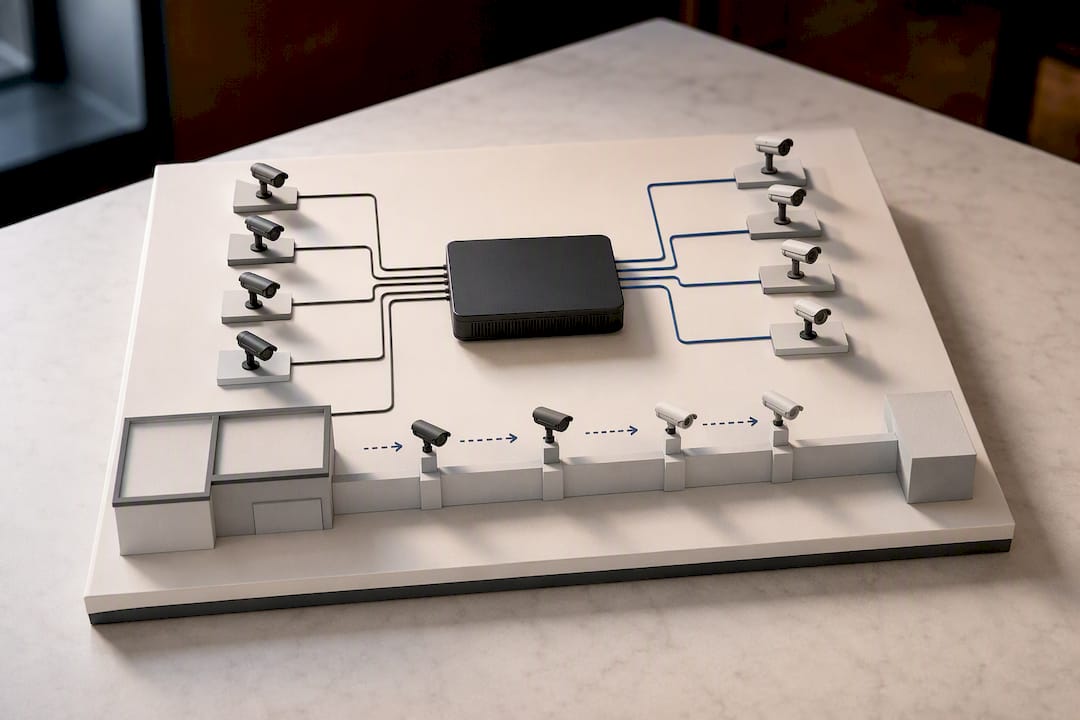
Coax-to-Ethernet converters exist, but they have real limits: they add cost per camera, introduce another point of failure, and won’t magically deliver 4K resolution out of an analog-only camera. Eventually, some positions need fresh cable pulls.
A sensible staged migration looks like this:
- Replace cameras at positions that require identification-level detail first.
- Add a hybrid recorder so old and new cameras run side by side during the transition.
- Install a PoE switch to support new IP cameras without rewiring the whole property at once.
- Leave low-priority or passive positions on analog until you can open walls or run new cable affordably.
Pro Tip: Most migration budgets get eaten by cable pulls, not camera hardware. Prioritize positions where new wiring is cheap or already accessible, and let the harder-to-reach spots wait for your next renovation cycle.
When Choosing a DVR Makes Sense
A DVR remains the right call in a handful of specific situations, and pretending otherwise does readers no favors.
- You already have working coax that reaches every camera position you need.
- Your only requirement is basic activity monitoring, not identification-level detail or analytics.
- Camera runs exceed Ethernet’s practical distance and extenders aren’t feasible.
- You’re deploying a short-term or budget-limited setup where 1080p is genuinely good enough.
If any of these describe your property, staying analog isn’t a compromise. It’s the appropriate tool for the job.
When Choosing an NVR Makes Sense
An NVR earns the higher upfront cost when your situation calls for more than basic footage.
- You’re building new or planning a prewire, where PoE cabling simplifies the entire install.
- You need 4K resolution, color night vision, or AI-driven analytics for identification.
- You expect to expand your camera count or mix brands over time, which ONVIF compatibility makes far easier.
- You want remote viewing on your phone and cloud backup as a second layer of protection.
For growing businesses or anyone planning more than a year or two ahead, this is generally where the smarter long-term value sits.
Network Exposure and Basic Security Steps for NVR Deployments
Here’s the good news first: an NVR system doesn’t require internet access to record locally. Internet connectivity only comes into play when you want remote viewing on your phone, cloud backups, or advanced analytics processed off-site. Local recording keeps running with or without a live connection.
That said, IP cameras do sit on your network, and that legitimately raises questions. Isolating your recorder on its own subnet or VLAN largely neutralizes the common worry that cameras “open up” your whole network to outside threats. A few other habits go a long way:
- Change every default password immediately, including the admin account on the NVR itself.
- Keep camera and recorder firmware updated on a regular schedule.
- Avoid direct port-forwarding to your NVR whenever possible.
- Enable two-factor authentication and use separate accounts instead of one shared admin login.
Pro Tip: If you’re not confident configuring VLANs or subnet isolation yourself, a professional CCTV integration team can set up network segmentation correctly the first time, which is far cheaper than fixing a breach after the fact.
Global Security’s Decision Framework for Recorder Choice
On client projects, recorder choice follows the cameras and the site, never a preference for one platform over another. We weigh whether footage needs to support identification, what existing cabling is already in place, and whether analytics or remote monitoring genuinely matter to the client’s goals. Security comes first; the hardware category is just a means to that end.
— Alston
Get a Professional Security Assessment for Your Property
Choosing between coax and Ethernet is only half the equation. Getting the installation, cabling, and network configuration right the first time is what actually protects your property. Global Security designs and installs CCTV integration projects built around your specific cameras, cabling situation, and budget, whether that means a clean NVR build-out, a staged hybrid migration, or a secure retrofit of an existing DVR system.

Beyond hardware, we also offer remote monitoring services that pair your camera system with trained personnel watching for activity in real time, cutting the cost of round-the-clock coverage compared to staffing a guard booth around the clock. If you want a second set of trained eyes on your footage instead of relying on notifications alone, this is where cameras and personnel work together instead of separately.
Ready to figure out which system fits your property? Request a site assessment and get a design recommendation built around your actual cabling, budget, and coverage needs.
Sources
- DVR vs. NVR: What’s the Difference and Which is Better?
- DVR vs NVR Security Systems 2026: Which Is Right for You?
- NVR vs DVR: What’s the Difference? (2026)
FAQ
Which Is Best, DVR or NVR?
NVR is the better default for most new installs, since it supports higher resolution, better analytics, and easier expansion. DVR remains a smart choice if you already have working coax or only need basic 1080p coverage.
Does NVR Work Without Internet?
Yes. An NVR records locally without any internet connection; internet access only matters for remote viewing, cloud backup, and certain analytics features.
How Do I Know If I Have NVR or DVR?
Check your cabling: coaxial cable with BNC connectors and a separate power line means DVR, while a single Ethernet cable running to each camera means NVR.
Do I Need an NVR for Security Cameras?
Only if your cameras are IP-based. Analog cameras need a DVR, IP cameras need an NVR, and the camera type you choose effectively decides the recorder for you.
Recommended
Related articles
Guard Services
Uniformed armed and unarmed guards for posts, events and mobile response.
DISCOVER MORERoving Patrol
Marked vehicle patrols that check, document and deter across your property.
DISCOVER MOREExecutive Protection
Low-profile protection for executives, families and high-risk visits.
DISCOVER MORENEED GUARDS ON SITE?
Speak with our dispatch team about coverage in Fort Myers, Cape Coral, Naples and across Southwest Florida.