
A reliable CCTV system depends on a scheduled preventive maintenance program covering four areas: camera physical condition, connectivity and power, recording and storage, and firmware or cybersecurity. Run weekly quick checks, monthly deeper inspections, quarterly technical reviews, and annual full audits. Document every finding and patch firmware promptly, since both gaps undermine footage reliability and system security.
TL;DR:
- Regular physical inspections are crucial to prevent issues like lens dirt, cracks, or misalignments that reduce image quality and system reliability.
- Monthly checks of cables, connectors, PoE, and backup power help identify early signs of wear or failure that could cause outages.
- Storage management requires monitoring drive health, avoiding capacity over 80%, and ensuring backups are successful for reliable footage retrieval.
- Firmware updates and security audits must be scheduled regularly to close vulnerabilities such as CVE-2026-5386 and prevent unauthorized access.
- Documenting all inspections and testing results supports compliance, helps troubleshoot recurring issues, and ensures accountability during security incidents.
Table of Contents
- Your CCTV Maintenance Checklist by Inspection Frequency
- How to Inspect and Clean Camera Lenses, Housings, and Mounts
- Checking Cables, Connectors, PoE, and Backup Power
- Keeping Your Recorders and Storage Reliable
- Patching Firmware and Auditing Access to Close Security Gaps
- Logging Inspections for Compliance and Evidence Handling
- Troubleshooting the Issues Maintenance Checks Turn Up
- How Global Security Applies This Checklist in the Field
- Why Proactive Maintenance Beats Reactive Repair
- Managed CCTV Maintenance From a Team That Builds the Systems
- FAQ
- Sources
Your CCTV Maintenance Checklist by Inspection Frequency
Breaking maintenance into intervals keeps the workload manageable and makes gaps easy to spot before they become outages. Axis recommends organizing checks into weekly, monthly, and quarterly intervals so technicians can catch small issues before they compound.
Weekly:
- Confirm live feeds display on every monitored channel.
- Check lenses for dust, smudges, or spider webs.
- Scan for new physical obstructions (branches, signage, parked vehicles).
- Verify recordings from the past 24 hours are retrievable.
Monthly:
- Inspect cables and connectors for wear or loose terminations.
- Test motion detection zones and alert notifications.
- Confirm available storage capacity and timestamp accuracy across devices.
- Review access logs for unusual login activity.
Quarterly:
- Apply tested firmware updates across cameras, recorders, and the VMS.
- Run a UPS load test and record battery runtime.
- Inspect housings, domes, and mounts for cracks, corrosion, or seal failure.
- Evaluate low-light and night-vision performance as seasons change.
Annual:
- Conduct a full system audit covering every camera, recorder, and network device.
- Run SMART diagnostics on all storage drives.
- Review maintenance policy against current standards and retention requirements.
- Re-test image quality against baseline footage captured at installation.
Coordinating this cadence with the technicians and camera operators who use the footage daily helps validate presets and field of view at the same time, which cuts down on configuration drift between visits, as Axis notes in its guidance on camera maintenance. For teams managing inspection workflows across multiple sites, field-service coordination tools like Yonderly can help technicians log completed tasks and flag exceptions without juggling spreadsheets.
How to Inspect and Clean Camera Lenses, Housings, and Mounts
Physical camera condition drives image quality more than any software setting. A dirty lens or a cracked housing will undermine even a well-configured system.
- Clean lenses with a microfiber cloth and a non-abrasive lens solution; avoid paper towels or household glass cleaners, which can scratch coatings, following the cleaning method Axis outlines for PTZ and dome units.
- Inspect dome covers and housings for scratches, hairline cracks, or signs of water ingress around seals.
- Run PTZ cameras through their full range, verify stored presets, and note any vibration, drift, or positional offset that suggests the motor or mount needs recalibration.
- Check mounting brackets and hardware for corrosion, especially on outdoor installations exposed to salt air or heavy rain.
Pro Tip: Photograph each camera’s field of view during every quarterly inspection; comparing images over time makes drift, obstructions, and seal degradation obvious at a glance.
Checking Cables, Connectors, PoE, and Backup Power
Intermittent outages usually trace back to connectivity or power, not the camera itself. A loose connector or a failing battery can take a feed offline long before anyone notices.
- Inspect exposed cable runs for cracking, rodent damage, or moisture pooling at low points.
- Confirm connectors are seated and secured with proper strain relief, particularly at junction boxes.
- Check PoE indicator lights on switches and review port-level logs for devices that drop and reconnect repeatedly.
- Simulate a power outage during UPS testing, measure battery runtime against the rated specification, and log the result.
- Monitor rack airflow and temperature, since overheated switches and recorders fail faster than properly ventilated ones.
Clean cable management in the rack also makes future troubleshooting faster. A practical guide to rack cable organization covers layout approaches that reduce accidental disconnections during routine service.
Keeping Your Recorders and Storage Reliable
A camera that records perfectly is worthless if the footage cannot be found, played back, or handed over when it matters.
- Verify each camera’s recording schedule matches its intended coverage window and that timestamps are synchronized across all devices.
- Monitor drive health through SMART warnings and keep storage utilization below roughly 80% of capacity, a threshold Axis flags as the point where NVR and DVR performance begins to degrade.
- Confirm archive and offsite backup jobs are completing successfully, and periodically test an export to make sure footage plays back cleanly outside the native VMS.
- Document retention periods and the handover procedure for footage requested as evidence.
Storage utilization above roughly 80% tends to degrade NVR and DVR performance, according to Axis, making it a practical ceiling for routine storage checks rather than a figure to approach gradually.
Patching Firmware and Auditing Access to Close Security Gaps
Cameras and recorders are network devices, and outdated firmware or forgotten credentials turn them into entry points. CVE-2026-5386 documents a critical unauthenticated password reset vulnerability affecting certain CCTV cameras, a clear reminder that firmware monitoring belongs in every maintenance cycle, not just the IT department’s backlog.
- Inventory firmware versions across all cameras and recorders, then apply vendor security updates after testing them on a non-production unit.
- Audit user accounts quarterly, removing old installer or contractor credentials and enforcing strong, unique passwords.
- Segment camera traffic onto its own network and restrict management access to HTTPS, SSH, or VPN connections only.
- Subscribe to vendor vulnerability advisories and route VMS health alerts to the team responsible for patching.
Pro Tip: Treat firmware updates like any other change to critical infrastructure: test on one device first, document the result, then roll out broadly. Partners such as LANCAST publish practical guidance on managed security practices that pairs well with an internal patch schedule.
Logging Inspections for Compliance and Evidence Handling
Documentation turns routine maintenance into defensible proof that a system was working, and working correctly, when it mattered.
- Record the date, technician, equipment IDs, defects found, and corrective action for every inspection, a practice that IEC 62676-4 ties directly to preserving evidentiary integrity.
- Preserve footage exports and chain-of-custody notes whenever an incident triggers a request for evidence.
- Reference the IEC 62676 series for image-quality and performance testing methods when evaluating whether camera output meets legal or insurance requirements.
- Maintain a versioned log of firmware updates and configuration changes alongside the inspection records.
Troubleshooting the Issues Maintenance Checks Turn Up
Most problems maintenance reveals fall into a handful of patterns, and each has a short diagnostic path.
- Blurry or low-quality images: clean the lens first, then check focus settings, then inspect for internal condensation or lens damage.
- Recording gaps: check power to the camera and recorder, test the network link, then run storage diagnostics on the drive.
- Camera offline: trace the cable and PoE connection, check the switch port status, then confirm the camera’s boot and firmware state.
- Excessive false alarms: adjust motion detection zones and sensitivity, then review lighting conditions that may be triggering false triggers.
How Global Security Applies This Checklist in the Field
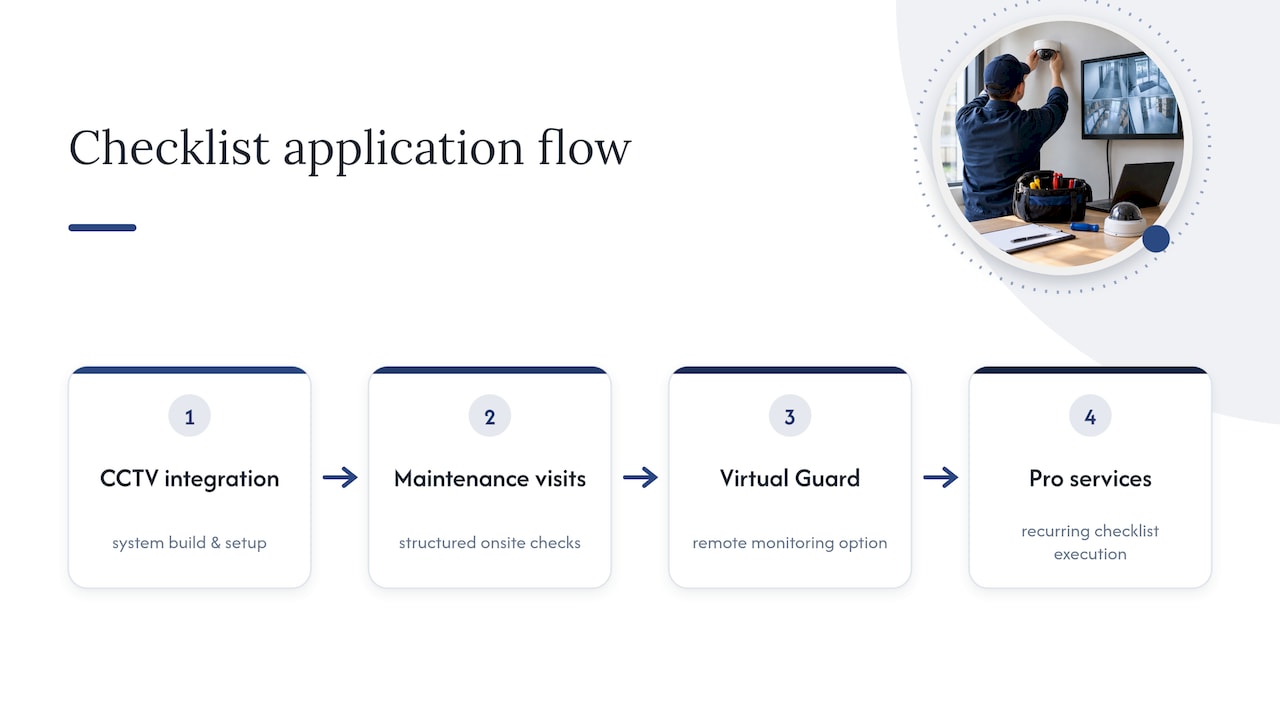
We build CCTV systems through our CCTV Integration service and support them afterward with structured maintenance visits and our Virtual Guard remote monitoring option. Facility teams that want this checklist executed on a recurring schedule, rather than tracked internally, can engage professional services to handle it.
Why Proactive Maintenance Beats Reactive Repair
Skipped maintenance rarely fails quietly. It fails during the one incident where footage was supposed to be there and was not, or where a patched vulnerability would have kept a camera off a public exploit list. A simple CMMS workflow paired with VMS health alerts closes most of that gap before it costs anyone a case or a contract.
— Alston
Managed CCTV Maintenance From a Team That Builds the Systems
Running this checklist internally works, provided someone owns it every week without exception. For facility and security teams that would rather hand the schedule to specialists, our CCTV Integration service covers both installation and the ongoing inspections outlined above, backed by Virtual Guard remote monitoring for sites that want eyes on footage between visits.

Reach out through our CCTV integration services page to scope a maintenance plan built around your site’s cameras, recorders, and compliance requirements.
FAQ
How do you perform CCTV maintenance?
CCTV maintenance follows a scheduled cadence: weekly visual and recording checks, monthly cable and motion-detection tests, quarterly firmware updates and UPS testing, and an annual full system audit. Each visit should be logged with the technician’s findings and any corrective action taken.
What is the standard procedure for maintaining a CCTV system?
The standard approach groups tasks by frequency and system area: physical camera checks, connectivity and power, recording and storage health, and firmware or cybersecurity review. IEC 62676 provides testing frameworks that inform the image-quality and performance checks used during these audits.
How often does CCTV need to be serviced?
CCTV systems benefit from weekly quick checks, monthly deeper inspections, quarterly technical reviews, and a full annual audit. Outdoor or harsh-environment cameras typically need more frequent physical inspection than indoor units in controlled conditions.
Does CCTV require ongoing maintenance?
Yes. Cameras and recorders are network-connected devices subject to lens dirt, cable wear, storage degradation, and firmware vulnerabilities, including issues like CVE-2026-5386, which affected unauthenticated access on some camera models. Skipping maintenance raises the risk of both equipment failure and security exposure.
Sources
- AXIS PTZ Camera preventive maintenance instructions and checklist
- Why security camera maintenance matters — Axis blog
- NVD: CVE-2026-5386