
 GLOBAL SECURITY GROUP INTL
AI-Powered Remote Video Monitoring for Facility Security
Remote video monitoring turns your camera network into an active detection system that spots threats in real time, verifies them through a trained operator, and…
Remote video monitoring turns your camera network into an active detection system that spots threats in real time, verifies them through a trained operator, and dispatches a response before losses occur. This approach, built on AI analytics paired with human review, works because it filters out the noise that makes traditional surveillance unreliable. Instead of a camera that simply records what already happened, you get a system that watches, flags, and confirms what’s happening right now.
Facility types that see the strongest results from remote video monitoring (RVM) share a few traits: exposed perimeters, after-hours vulnerability, and high asset value relative to on-site staffing. That includes:
- Warehouses and distribution yards with overnight exposure
- Construction sites with mobile equipment and material theft risk
- Retail locations facing after-hours break-ins
- Data centers requiring continuous perimeter awareness
Security managers who deploy RVM well typically report fewer guard hours billed, a measurable drop in false dispatches, and faster verified response when something real happens.
Key Takeaways
Remote video monitoring works because it pairs AI-driven detection with trained human verification, cutting false dispatches while speeding up real response.
| Point | Details |
|---|---|
| RVM is active, not passive | Unlike CCTV, RVM watches live and intervenes through audio talk-down or dispatch before losses occur. |
| AI filters, humans decide | Suppression tuning cuts nuisance alerts, but trained operators make the final escalation call. |
| Network design decides reliability | PoE switch capacity and bandwidth planning matter as much as camera quality. |
| Pilot before you scale | Run a 30 to 60 day test with defined KPIs before committing to a multi-site contract. |
| Global Security offers Virtual Guard | Combines AI analytics with a trained SOC staffed by law enforcement and military veterans for verified response. |
Table of Contents
- What Is Remote Video Monitoring and How Does It Differ From CCTV?
- What Practical Benefits Do Security Managers Get From RVM?
- How Does the Detection-to-Response Workflow Actually Work?
- What Can AI Actually Do, and Why Does Human Verification Still Matter?
- What Systems and Network Setup Does RVM Require?
- How Do Providers Price Remote Monitoring Services?
- What Track Record Backs This Approach?
- How Do You Run a Pilot Before Scaling Up?
- What Do Most Security Managers Get Wrong About RVM?
- Ready to Pilot Virtual Guard at Your Facility?
- Sources
What Is Remote Video Monitoring and How Does It Differ From CCTV?
Remote video monitoring is an active security service. Traditional CCTV is a documentation tool. That distinction defines everything else in this guide.
A standard CCTV setup records footage to a hard drive or cloud archive and waits for someone to review it, usually after an incident already happened. Nobody is watching the feed live unless you pay a guard to sit in front of a monitor bank, which is expensive and prone to fatigue-driven lapses. RVM flips that model. Cameras feed into an AI-powered remote video monitoring platform that scans for movement, objects, and behavior patterns around the clock, then routes anything suspicious to a live operator at a security operations center (SOC) for verification.
The practical difference shows up the moment something happens. With legacy CCTV, you find out about a break-in when someone notices missing inventory the next morning and pulls the tape. With RVM, an operator sees a person cross a perimeter line at 2 a.m., confirms it’s not an employee or a stray animal, and can trigger a live audio warning or call police before the intruder even reaches the loading dock. One system documents. The other intervenes.
What Practical Benefits Do Security Managers Get From RVM?
The value of remote monitoring shows up in three places: deterrence, cost, and evidence quality.
Live-monitored cameras with two-way audio create a stronger deterrent effect than passive recording systems, because a visible camera paired with a real-time voice challenge tells an intruder someone is actually watching. Research on remote video surveillance confirms that active monitoring with audio talk-down reduces incidents compared to unmonitored setups. That single feature, an operator speaking through a camera speaker, resolves a large share of trespassing and loitering incidents before anyone needs to call police.
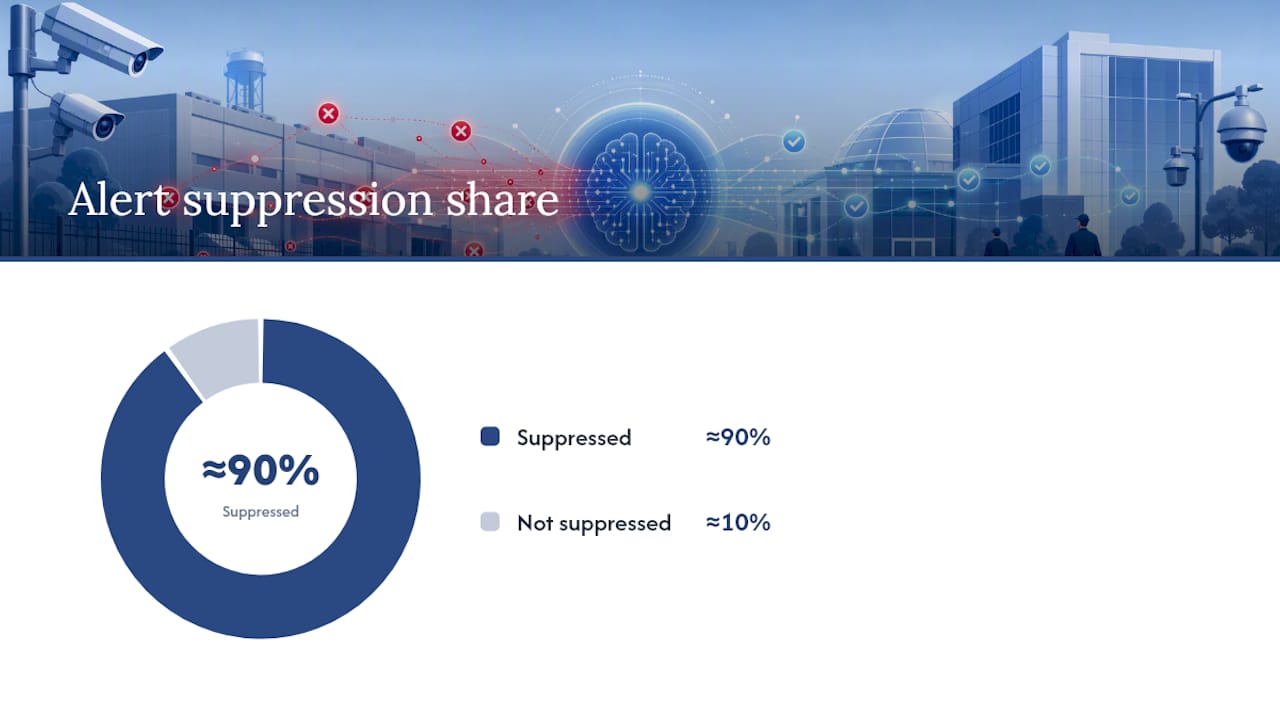
Statistic Callout: Providers of AI-verified remote monitoring report nuisance alert suppression rates often above 90% before an operator ever reviews the footage, which means human reviewers spend their attention on events that actually matter.
Cost comparisons favor RVM for many mid-size and multi-site operations. A rotating guard schedule requires paying for hours whether or not anything happens; a monitoring subscription scales with camera count and coverage window instead of headcount. Track these signals when you build your business case:
- Guard rotation cost per site per month versus monitoring subscription cost
- False-positive rate and how many dispatches were unnecessary
- Time-to-verify from motion trigger to operator confirmation
- Verified-incident rate as a share of total alerts
Security managers who’ve made the switch commonly cite reduced theft losses, fewer unnecessary patrol trips, and investigation files that arrive with time-stamped, operator-annotated video instead of raw footage someone has to scrub through manually.
How Does the Detection-to-Response Workflow Actually Work?
Every RVM deployment runs through the same basic lifecycle, though the sophistication of each stage varies by provider.
- Camera and sensor input. Cameras capture continuous video, and many systems layer in motion sensors or thermal detection for perimeter zones where lighting is inconsistent.
- AI analysis. Video analytics classify what’s in frame, distinguishing a person from a vehicle, a delivery truck from a loitering car, or a swaying tree branch from an actual intrusion. Some analytics run at the edge, on the camera or a local appliance, to reduce latency; others run in the cloud, trading a bit of speed for easier scaling across sites.
- Rule-based filtering. Contextual rules, like ignoring movement in a parking lot during business hours but flagging it at midnight, cut down on nuisance alerts before a human ever sees them.
- Operator verification. A live SOC operator reviews the flagged clip, confirms whether it’s a genuine threat, and captures evidence, pairing AI analytics with trained human review to keep false alarms from becoming real dispatches.
- Escalation. Depending on severity, the operator can issue an audio talk-down warning, notify on-site personnel, or contact police directly with verified evidence in hand.
Reliability throughout this chain depends heavily on network performance. Delayed footage or dropped connections at step one make every downstream step slower or unreliable, so bandwidth and cabling decisions matter as much as camera specs.
What Can AI Actually Do, and Why Does Human Verification Still Matter?
AI analytics handle object detection, behavior rules, and time-of-day context reliably. Modern systems distinguish people from vehicles, flag line-crossing and loitering, and, where local law permits, read license plates or match known faces. That’s genuinely useful pattern recognition, but it’s not judgment.
Environmental noise still trips up automated detection. Animals, wind-blown debris, headlight glare, rain, and shifting shadows all generate motion that looks like a threat to a camera but obviously isn’t to a trained eye. That’s the entire reason the human layer exists: a systematic review of remote monitoring programs found that continuous automated monitoring delivers real benefits but also introduces workload and data-accuracy challenges that only trained review can resolve.
When you’re evaluating a provider, ask for specifics rather than marketing claims:
- What’s the nuisance suppression rate before an event reaches an operator?
- What confidence threshold triggers escalation, and can it be tuned per site?
- Can they show examples of tuning for your specific environment, like a coastal yard with heavy fog or a retail lot with constant foot traffic?
Pro Tip: Ask a prospective provider to walk through one real false-positive event and explain exactly why their system suppressed it or escalated it. Vendors who can’t produce a concrete example usually haven’t done the tuning work.
What Systems and Network Setup Does RVM Require?
Reliable remote monitoring depends on infrastructure choices made before a single camera goes live, and this is where projects most often stumble.
Camera compatibility matters first. Look for ONVIF or RTSP support so cameras integrate cleanly with your video management system (VMS), along with adequate resolution, wide dynamic range (WDR) for high-contrast lighting, and true low-light or infrared performance for overnight coverage. Cloud-based VMS architectures scale faster across multiple sites; on-premise systems give you more direct control but require more IT overhead per location.
Network design is frequently the deciding factor in whether a system performs well or generates constant complaints. Inadequate PoE switch capacity and oversubscribed uplinks are the most common cause of underperforming deployments, not weak cameras. Before rollout, confirm:
- PoE switch capacity sized for your total camera count, with headroom for future additions
- Dedicated bandwidth per camera, plus a cellular failover path for sites prone to outages
- Segmented VLANs to keep camera traffic isolated from other network activity
- Encrypted storage with defined retention periods and role-based access control
- Integration points with existing access control and alarm panels
A CCTV integration partner who understands both the physical and network side of a deployment will catch these gaps before they become downtime.
How Do Providers Price Remote Monitoring Services?
Pricing shapes vary more than most buyers expect, and the structure you pick should match how your risk is distributed across sites.
Common models include a fixed monthly fee per site, a per-camera subscription that scales with coverage, bundled packages combining hardware and monitoring into one contract, or per-incident billing for lower-traffic locations. Providers structure pricing around service level as much as camera count, and the biggest cost drivers are usually the SLA tier (24/7 coverage versus business-hours-only), whether audio talk-down is included, storage retention length, and any advanced analytics add-ons like license plate recognition.
Before signing, push for clarity on a few contract items:
- Written SLA definitions for time-to-verify and time-to-dispatch, not vague language
- A trial or pilot period before a multi-site commitment
- Explicit data ownership terms for stored footage
- Clear escalation and cancellation clauses
Deployment timelines vary by scope, but a single-site pilot typically moves faster than a multi-site rollout, where network standardization across locations adds the most delay. Budget extra ramp time if your sites don’t already share consistent network infrastructure.
What Track Record Backs This Approach?
This guide draws on operational security experience from Global Security’s leadership team, which includes former law enforcement and military personnel who’ve run monitoring and patrol operations for commercial clients across multiple industries. That background shapes the practitioner-first approach throughout this article: measurable KPIs first, vendor accountability second, technology as a tool rather than a silver bullet.
Global Security’s Virtual Guard service integrates AI-based detection with a staffed SOC, backed by operator training programs that keep escalation decisions consistent across shifts. That combination reflects a broader philosophy the company has written about in its work on building a smarter, more customized security strategy.
Clients evaluating a switch from guard rotations to Virtual Guard monitoring should ask for site-specific pilot metrics before committing to a full-site or multi-site contract.
Ask directly for verified-incident rates, response time data, and reference sites comparable to your own operation before you sign anything.
How Do You Run a Pilot Before Scaling Up?
A short, well-defined pilot tells you more about a provider than any sales deck. Structure it around these steps:
- Survey the site and inventory existing cameras, network capacity, and blind spots.
- Test the network under load to confirm bandwidth and PoE capacity hold up.
- Set pilot KPIs in advance: false-positive suppression rate, time-to-verify, and verified-incident rate, tracked over a defined 30 to 60 day window, a timeframe consistent with best-practice guidance on proof-of-concept pilots.
- Document the escalation matrix, including talk-down scripts, evidence handling steps, and exactly when police get notified.
- Review vendor answers on SOC staffing levels, redundancy plans, and who owns the recorded data.
Pro Tip: Track cost per avoided incident during the pilot, not just cost per camera. It’s the number that actually justifies the budget line to your leadership.
What Do Most Security Managers Get Wrong About RVM?
The biggest misconception I see in this space is treating AI as the finished product rather than the filter. Vendors sell the algorithm because it’s the flashy part, but the algorithm’s real job is narrow: cut the flood of meaningless motion alerts down to a manageable stream so a trained person can make the call that actually matters. Buy a system for its detection specs alone and you’ve bought half a solution.
The conventional advice tells buyers to compare camera resolution and analytics feature lists. That’s the wrong starting point. Start with the SOC. Ask how operators are trained, how escalation decisions get made at 3 a.m., and what happens when the network hiccups during a real event. A facility with mediocre cameras and a sharp, well-drilled SOC will outperform a facility with premium cameras and an undertrained call center every time.
Prioritize the pilot. Numbers from a 30 to 60 day test on your own site tell you more than any vendor’s marketing sheet, and they give you leverage to negotiate SLA terms that actually match your risk profile instead of a generic template.
Ready to Pilot Virtual Guard at Your Facility?
Global Security’s Virtual Guard program gives you the AI-plus-SOC model this guide describes, run by a team built from law enforcement and military operators rather than call-center staff learning security on the job. That operational background is the difference between a provider who reads alerts off a screen and one who knows how to run an escalation matrix under real pressure. Virtual Guard integrates directly with your existing cameras and access control, backed by trained personnel who verify events before anything reaches you or local police.

Global Security also backs its monitoring services with executive protection and roving patrol options for clients who want a blended physical and virtual security posture, plus training programs that bring your own staff up to the same operational standard. If you’re ready to see what a real pilot looks like on your site, request a consultation through Global Security’s guard services page and get a scoped proposal built around your camera count, site layout, and coverage window.
Sources
- AI-Powered Remote Video Monitoring and Analytics | Brivo
- 24/7 Remote Video Monitoring with Live Operators | VDS
- Remote Video Surveillance: Benefits for Property Safety
- Systematic review on remote patient monitoring (PMCID)
Recommended
Related articles
Guard Services
Uniformed armed and unarmed guards for posts, events and mobile response.
DISCOVER MORERoving Patrol
Marked vehicle patrols that check, document and deter across your property.
DISCOVER MOREExecutive Protection
Low-profile protection for executives, families and high-risk visits.
DISCOVER MORENEED GUARDS ON SITE?
Speak with our dispatch team about coverage in Fort Myers, Cape Coral, Naples and across Southwest Florida.