
 GLOBAL SECURITY GROUP INTL
Security: Pilot First Access Control Integration on Open Standards
Access control integration links your door hardware to video, alarms, visitor management, and identity systems so a single event triggers a unified operator response instead…
Access control integration links your door hardware to video, alarms, visitor management, and identity systems so a single event triggers a unified operator response instead of a scattered scramble across disconnected screens. Done right, it produces faster verification, automated escalation, and one audit trail instead of five. The systems most worth connecting first are video, intrusion alarms, and visitor management. The safest path there is a pilot on one building or one workflow, running on open architecture, before you scale.
TL;DR:
- Integrating video, alarms, and visitor management with access control enables faster verification, standardized responses, and simplified audit trails.
- Prioritize starting with video management and analytics, then link intrusion alarms and visitor systems to maximize early operational benefits.
- Use open architecture and documented APIs, along with a gateway layer, to ensure future flexibility and prevent vendor lock-in over time.
- Conduct pilot deployments on one site or workflow first, validating event data and failover procedures before scaling across the organization.
- Ensure compliance by mapping data flows, applying role-based permissions, and involving legal teams to meet privacy and data protection standards.
Table of Contents
- What Is Access Control Integration and Why Does It Matter?
- Which Systems Should You Integrate With Access Control First?
- How Do You Build a Technically Sound Integration?
- Cloud, On-Premises, or Hybrid: Which Deployment Model Fits?
- What Does an Access Control Integration Roadmap Look Like?
- Why Integrator Expertise Changes Project Outcomes
- What Happens When an Integration Fails or Gets Breached?
- What Compliance Rules Apply to Integrated Access Control?
- Why Do Vendor Compatibility Issues Still Trip Up Integrations?
- Why Pilot-First and Open Standards Beat Feature Checklists
- How Global Security Turns Integration Into Layered Protection
- Sources
What Is Access Control Integration and Why Does It Matter?
Security system integration means your access control platform stops operating as an island. Instead, it exchanges events in real time with video management, intrusion alarms, and other operational systems so a badge swipe, a forced door, or a visitor check-in all feed into one response chain.
The payoff shows up in four places:
- Faster verification. A denied badge attempt automatically pulls the nearest camera feed, so an operator sees the person, not just an alert code.
- Consistent incident response. Standardized escalation paths mean the same alarm type gets the same response every time, regardless of which operator is on shift.
- Lower manual overhead. Fewer systems to check manually means fewer false alarms slipping through and less time spent toggling between platforms.
- Compliance-ready audit trails. Investigators and auditors get one correlated timeline instead of reconciling logs from separate systems after the fact.
Integration only pays off when it changes how operators actually work. Linking access events, alarms, and video into a single response workflow with standardized escalation is what separates a connected system from a merely installed one, according to Hirsch’s analysis of connected security ecosystems.
Sites that integrate visitor management alongside access control also see a direct reduction in reception workload, since temporary credentials and host notifications can be automated rather than handled at a front desk. None of this requires ripping out existing hardware. It requires a plan for what talks to what, and in what order.
Which Systems Should You Integrate With Access Control First?
Most security estates have a handful of natural integration points, and prioritizing them correctly determines how quickly you see returns. Integrated access control commonly spans video management, analytics, alarm systems, building management, and communications platforms, but not all of these deserve equal priority on day one.
- Video management and analytics. Camera call-up on a door event is the highest-value, lowest-risk starting point. Analytics can also trigger access actions, such as locking a door when a loitering pattern is detected.
- Intrusion and alarm systems. Linking alarms to access control enables automated lockdown sequences and forces verification before an operator dispatches a response.
- Visitor management. Pre-registration and temporary credential issuance cut manual desk work and close the gap between who is expected and who is actually badging in.
- Identity and HR directories. Connecting to Active Directory or an SSO provider automates provisioning when someone is hired and, critically, deprovisioning the moment they leave.
- Building management and IoT. Occupancy data can drive HVAC scheduling, lighting, and elevator access, turning security data into facilities savings.
- Communications and PSIM platforms. These unify incident handling so operators work from one interface instead of switching between access, video, and radio dispatch tools.
Start with whichever of these already has the most operational pain attached. If your front desk is buried in visitor paperwork, that is your pilot. If false alarms are burning operator hours, start with alarms and video.
How Do You Build a Technically Sound Integration?
The biggest long-term risk in access control integration is not the initial build. It is getting locked into a single vendor’s ecosystem and losing flexibility five years later.
Design decisions that hold up:
- Choose open architecture and documented APIs. Platforms with well-documented APIs and broad third-party support let you add or swap systems later without a forklift upgrade, a point echoed across platform-level access control offerings built around open ecosystems.
- Use a connector or gateway layer to normalize data. Older door controllers and newer cloud platforms rarely speak the same language natively. A gateway layer, or an integration-platform-as-a-service (iPaaS) approach, translates between them without custom one-off code for every device.
- Define deterministic event flows. An alarm should always follow the same sequence: verify, escalate, report. Ambiguous logic is where automated responses go wrong.
- Secure every connection point. Encrypt data in transit, prefer outbound-only connectors where possible to reduce your attack surface, and enforce strong authentication on every integration endpoint.
- Synchronize your logging. Use NTP for consistent timestamps across every connected system, or your audit trail becomes a guessing game about which event happened first.
Security professionals increasingly treat open standards as a scalability strategy, not a nice-to-have, because building on a closed ecosystem raises your future migration cost every year you wait.
Pro Tip: Run every new automated action, especially anything that locks a door or triggers a lockdown, in a sandboxed pilot first, with a manual rollback switch. An automation that fails silently at 2 a.m. is far worse than no automation at all.
Cloud, On-Premises, or Hybrid: Which Deployment Model Fits?
The deployment model you choose shapes everything from update speed to legal exposure, so it deserves its own decision point rather than a default.
Cloud-based deployments centralize management across multiple sites and push updates automatically, which suits organizations with distributed locations and limited on-site IT staff. On-premises deployments keep data inside your own infrastructure, often air-gapped from the internet, which matters for organizations facing strict data sovereignty requirements or classified environments. Hybrid models are increasingly common as a migration pathway: controllers stay on-premises for resilience, while management and analytics run in the cloud.
Before signing anything, run through this checklist:
- Does the vendor’s API maturity support the integrations you actually need, not just the ones in the demo?
- Does it support your existing device mix, or will you need to replace hardware?
- Are certified integrators available in your region for installation and ongoing support?
- Does the platform meet your industry’s compliance obligations?
- What does total cost of ownership look like over five years, not just the installation invoice?
What Does an Access Control Integration Roadmap Look Like?
A structured rollout beats an ambitious one. A pilot-first deployment model, start small, validate, then scale, is the pattern that experienced integrators recommend for a reason: it proves value before you commit budget to a full rollout.
- Define scope and KPIs. Set numeric targets before you start: mean time to respond (MTTR), operator time saved per shift, or percentage reduction in false alarms.
- Pick a bounded pilot. One building, one visitor workflow, or a single high-traffic door gives you a controlled test without enterprise-wide risk.
- Validate the integration. Check data fidelity, event latency, permission accuracy, and what happens during a failover before calling it done.
- Scale with templates. Once the pilot works, document the runbook and repeat it across sites rather than reinventing the configuration each time.
- Hand off to operations with SLAs. Define who owns firmware updates, credential lifecycle management, and change control once the project team moves on.
| Roadmap stage | Primary goal | Success signal |
|---|---|---|
| Define requirements | Set measurable KPIs | Documented MTTR and cost baseline |
| Pilot | Prove value on one site | Validated data fidelity and failover |
| Scale | Repeat what worked | Standardized runbook across sites |
| Operate | Sustain the gains | SLA-backed lifecycle management |
Why Integrator Expertise Changes Project Outcomes
A capable integrator does more than run cable and configure software. Integrators who differentiate themselves tie access control to video, alarms, and visitor systems while offering operational models built for multi-site estates, which is exactly the difference between a system that works on demo day and one that still works two years in.
Layered coverage matters as much as the technology stack itself. Remote monitoring services like Virtual Guard can watch integrated camera and access feeds in real time, giving on-site guard teams and executive protection details a second set of eyes without adding headcount.
When you evaluate a contract, insist on documented acceptance tests, written runbooks, operator training, and clear support SLAs. A project manager who can’t produce those on request is a warning sign, not a formality to skip.
What Happens When an Integration Fails or Gets Breached?
Every integration adds a new failure point alongside its new capability, and pretending otherwise is how projects get burned. Contingency planning has to cover both system failure and security compromise, and the two require different responses.
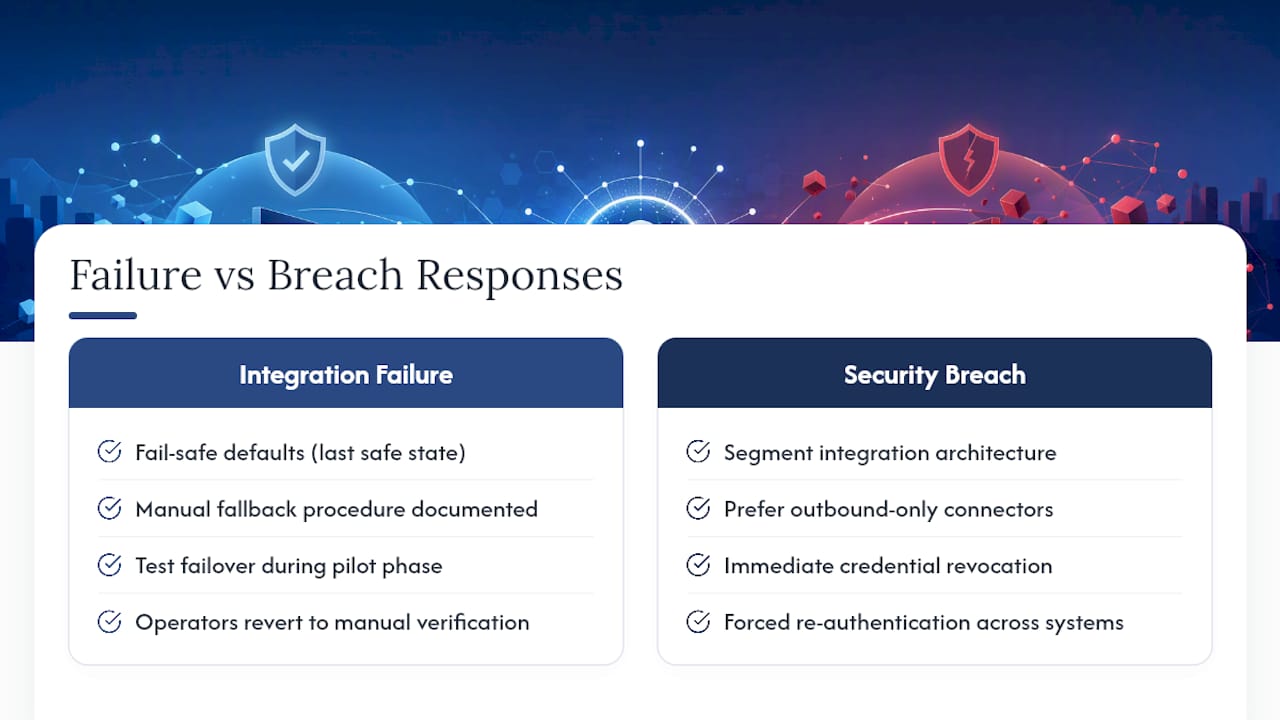
For integration failures, build fail-safe defaults into every automated action. If the connection between your access panel and video system drops, doors should default to their last known safe state, not an undefined one. Document a manual fallback procedure for every automated workflow, so operators can revert to manual verification without a delay while IT troubleshoots. Test failover scenarios during the pilot phase, not after go-live, so you know exactly what breaks and how gracefully.
For security breaches, segment your integration architecture so a compromised connector cannot cascade into your entire access control platform. Outbound-only connections, where the access system reaches out rather than accepting inbound calls, meaningfully reduce that exposure. Maintain an incident response plan specific to access control that includes immediate credential revocation, forced re-authentication across connected systems, and a communication chain to facilities and legal teams.
Contracts with integrators should specify breach notification timelines and responsibilities for patching. Don’t assume your vendor’s standard SLA covers this. Ask directly, and put the answer in writing before the system goes live.
What Compliance Rules Apply to Integrated Access Control?
Integrating access control with video, visitor management, and HR directories means you are now handling more personal data across more systems, which raises your compliance exposure rather than lowering it.
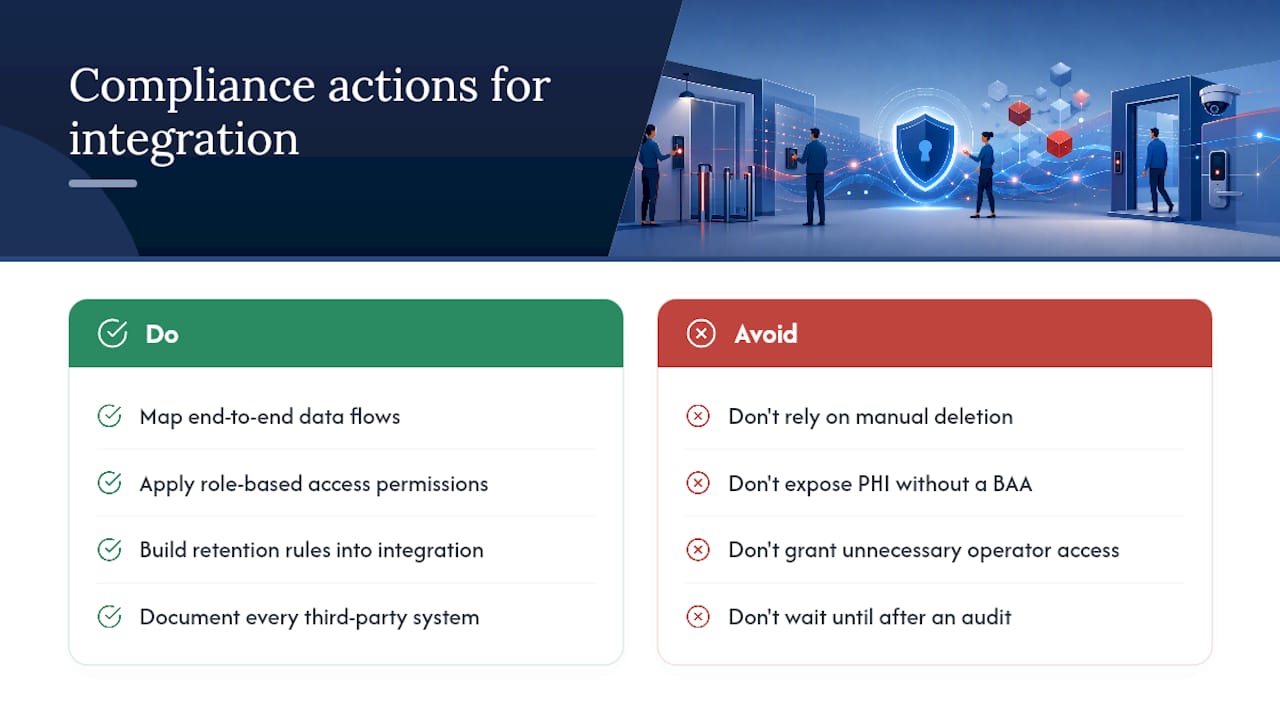
Under GDPR, biometric access credentials and video footage tied to identifiable individuals count as personal data, which means integrated systems need a documented lawful basis for processing, defined retention periods, and the ability to fulfill data subject access requests across every connected platform, not just the primary access control database. HIPAA-covered environments, such as hospitals and clinics using access control to protect areas with patient records, need to ensure that integration logs and audit trails don’t inadvertently expose protected health information to systems or vendors without a business associate agreement in place.
The practical fix is the same across frameworks: map exactly where data flows once systems are connected, and apply role-based permissions so operators only see what their job requires. A receptionist verifying a visitor badge does not need access to HR termination records, even if the systems are technically linked. Build data retention rules into the integration itself, rather than relying on manual deletion, and document every third-party system that touches personal data for your compliance file. When in doubt on a jurisdiction-specific requirement, involve your legal or compliance team before go-live, not after an audit request arrives.
Why Do Vendor Compatibility Issues Still Trip Up Integrations?
Interoperability problems rarely come from a single dramatic failure. They come from small mismatches: a legacy door controller that only speaks a proprietary protocol, a video system with an undocumented API, or two platforms that both claim to support a standard but implement it slightly differently.
Gateways and connectors exist specifically to unify devices that were never designed to work together, translating between protocols so you are not stuck waiting for a vendor to build a native integration that may never come. Before committing to any platform, ask for a list of certified third-party integrations, not marketing language about “open compatibility.” Request a technical demo of the exact device models in your estate, not a generic showcase.
When compatibility gaps do appear, an iPaaS layer or dedicated connector can bridge them without forcing a full hardware replacement, buying you time to phase out legacy equipment on your own schedule. Budget for this bridging cost during the selection phase. Treating interoperability as a post-launch surprise is how projects blow past their timeline and their budget in the same quarter.
Why Pilot-First and Open Standards Beat Feature Checklists
The biggest mistake I see security teams make is buying integration capability based on a feature list instead of an operator workflow test. A platform can support forty integrations on paper and still fail if your operators can’t act on an alert in under thirty seconds. Pilot-first isn’t caution for its own sake. It’s the only way to see whether an integration actually changes behavior at the console, not just on a spec sheet. Procurement teams should weight API maturity and integrator certification as heavily as price, because a cheap system with a closed ecosystem gets expensive the day you need to add one more camera brand.
— Alston
How Global Security Turns Integration Into Layered Protection
Global Security is the alternative to piecing together access control integration through a patchwork of vendors with no single accountable partner. We combine CCTV system integration with remote monitoring through Virtual Guard, so your cameras, alarms, and access events feed into a real-time watch operation, not just a recorded archive nobody checks until after an incident.

Our team includes seasoned law enforcement and military professionals who understand what a working escalation path looks like under pressure, not just how to wire a panel. Beyond monitoring, our guard services and executive protection teams give you a physical response layer that activates the moment an integrated system flags a threat. If you’re evaluating a pilot project or want a technical audit of your current setup, reach out through our services page to scope a bounded first phase before committing to a full rollout.
Sources
For deeper technical grounding beyond this guide, Kong’s overview of open access control architecture covers API-first design, and Acre Security’s practical integration guide expands on pilot-to-scale planning.
- Secure access control with OPA and Kong (Kong Blog)
- Access Control Integration: A Practical Guide (Acre Security)
- Access Control System Integrations | Streamline Visitor … (Sign In Solutions)
- Security System Integration & Connected Ecosystems (Hirsch)
Recommended
Related articles
Guard Services
Uniformed armed and unarmed guards for posts, events and mobile response.
DISCOVER MORERoving Patrol
Marked vehicle patrols that check, document and deter across your property.
DISCOVER MOREExecutive Protection
Low-profile protection for executives, families and high-risk visits.
DISCOVER MORENEED GUARDS ON SITE?
Speak with our dispatch team about coverage in Fort Myers, Cape Coral, Naples and across Southwest Florida.